Life gets in the way of crafting more often than I’d like. When that happens I rely on how I’m tracking my projects to get back into the project faster. I primarily rely on paper and pen over electronic tracking, but I’ll tell you about all the methods I use.
[Note: the links marked affiliate links can make me money if you click on the link and make a purchase. Read my more detailed affiliate policy here.]
How I’m tracking my overall craft projects
I like to keep track of when I start and finish projects. This is to keep a perspective on my overall crafting experience. It’s pretty easy to forget how long I’ve been working on a project. It’s also easy to forget how many projects I’ve finished.
I used to track this on a separate piece of paper that I printed out, but I found it hard to keep track of the paper and therefore harder to keep up with the list. Now I put it in my Leuchtterm notebook that I’m using as my non-daily Bullet Journal. I have a page for the started projects and one for the finished projects.
Just to be fancy, I write these down with my Pilot Metropolitan fountain pen with a medium nib that’s filled with J. Herbin’s Gris de Houle ink. I keep this inked up so I can count on there being a consistent ink color across the months and years.
Leuchtterm notebook
Buy on Amazon (affiliate link), Buy at JetPens
Pilot Metropolitan fountain pen
Buy on Amazon (affiliate link), Buy at JetPens, or Buy at Goulet Pen Co.
Gris de Houle ink
Buy at Goulet Pen Co.
Tracking my projects daily
For my daily tracking, I use a Field Notes notebook and a Jetstream UniBall .5mm pen. I use this setup to document what I do each day with individual projects. If it has rows or rounds I use tally marks to show how many rows or rounds I did. If it’s something else like edging, weaving in ends, a partial row, tearing something out, etc. then I write that out. This is often where I’ll first write down that I started or finished a project. I then transfer that information to my nicer notebook for my overall recordkeeping.
It can be kind of tedious to mark down shorter rows, but I’ll prop the notebook open to mark them even quicker. I appreciate having the record more than I get annoyed at having to document so frequently. To access the current page quicker I use a 3 by 5 inch index card as a bookmark.
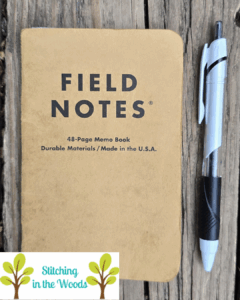
Field Notes
Buy on Amazon (affiliate link), Buy on JetPens
Jetstream pen
Buy on Amazon (affiliate link), Buy on JetPens
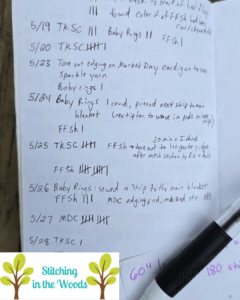
Tracking my projects on the pattern
For most of my projects I have a printed pattern. I use this pattern to represent the project in my organization system. It’s also my hub for all my documentation concerning the project.
To keep track of rows or rounds, I typically use my Knitting Buddy app or a row counter (just for my knitting). If it’s more complicated, then I’ll write out the repeats or whatnot on the pattern itself and cross them off as I complete each row or round. For when I don’t feel like hand-writing a bunch of rounds, I create a spreadsheet of all the rows.
When I remember to, I also write on the pattern when I started and finished the project, including if I completed multiples of it. I try to keep notes of tips, tricks, or modifications, too. This is especially useful if I decide to re-make the project in the future.
I was recently reminded why I should make all these notes. This month I picked back up a corner to corner temperature blanket I had been making several years ago. It’s taken me some detective work to get to the point of being able to start working on it again. I’ve had to track down which temperatures I was using and guess what hook I was using. If I had written that stuff down I would have been able to get crafting sooner.
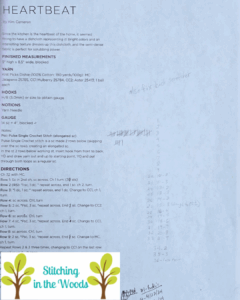
This is for a washcloth that’s in my 52 weeks of dishcloths pattern book (affiliate link)
Conclusion
This is a system that has been developed after a lot of little changes. It’s also very likely to change in the future as my preferences or habits change. If you’re looking to better streamline your tracking, start with one change and keep adding things to find a system that works. And don’t be afraid to get rid of something that just doesn’t work for you anymore.
How do you keep track of your projects?
FREE Temperature Tracker!!!!

Enter your email address and you'll get a completely free, ready to print temperature tracker to use for your project.